

The free RobiFox website preview lets you try an assistant built from a small sample of your own website before creating an account. It is a useful first check: can it find a relevant answer, point you to the supporting page, and recognise a question your content does not cover?
A good preview gives you a reason to investigate further. It does not establish that every page has been read, every answer is correct, or your assistant is ready for customers. This guide explains how to run that first check and keep a clear record of what you actually tested.
Preview limits checked on 29 October 2026: up to 10 website pages, 15 questions and 30 days of access to the finished preview. Check the request form for current limits before starting.
Start with a website you own or have permission to test
Choose the public website your visitors use. For an English-language evaluation, begin with its English version and use English questions. Pick a site whose content you can check yourself; you will need to compare the assistant’s answer with the underlying page.
Before requesting the preview, write down two questions. The first should have a clear answer on a public page, such as what a service includes. The second should ask for information the site does not supply, such as a private account detail or an unpublished delivery commitment. Use invented account references, never a real customer’s details.
That small preparation makes the preview more useful than a sequence of easy questions chosen after seeing what it already knows.
Request the preview, then start it from the email
- Open the RobiFox homepage and select Get my free website preview.
- Enter your email address and website address. The newsletter option is separate and optional.
- Select Send my verification e-mail. Receiving a message is a separate step from submitting the form.
- Open the verification email and follow it to the preview start page. Start the preview there; submitting the original form alone does not complete the process.
- When the assistant is ready, inspect the pages it read before asking your prepared questions.
No credit card or account is required for this website preview. It is created on a separate page and does not install a chat widget on your website. Keep the email confirmation link private. If you share the finished preview with a colleague, you share its question allowance rather than giving each person a new allowance.
Check the page sample before judging the answers
Up to 10 pages is a limit, not a promise that every relevant page is included. A pricing page, policy or English service description outside that sample cannot support an answer in this preview. A website with hundreds of pages needs a broader evaluation.
Look through the listed source addresses. Does the sample include the page you expected? Is it the right language? Is the answer still current on that page? If the page was not included, record a coverage gap rather than concluding that the assistant ignored information it had read.
Also check what the source itself says. If two pages publish conflicting terms, the preview cannot decide which commitment your business intends to make. Correct the underlying material and review the resulting knowledge before relying on it.
What happened in our own preview on 29 October 2026
We submitted robifox.com from its English homepage, received the verification email, opened the start page and selected Build my preview. An initial submission returned a security-check error; reloading the page and submitting the form again succeeded. We did not bypass the security check.
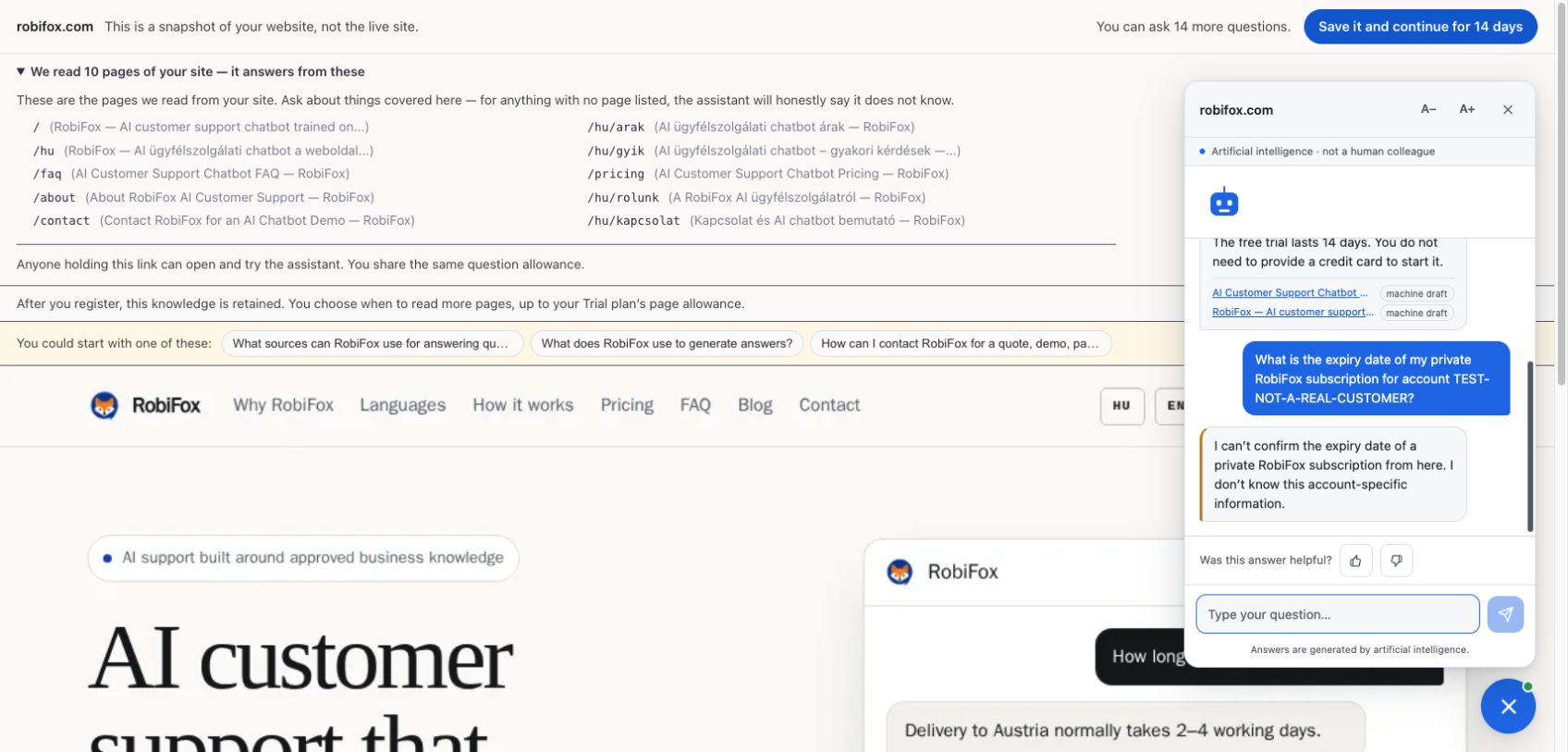
The finished preview reported 10 pages read. Its list contained five English addresses: /, /faq, /about, /contact and /pricing. It also contained five Hungarian addresses: /hu, /hu/arak, /hu/gyik, /hu/rolunk and /hu/kapcsolat.
This matters for the scope of the result: starting from our English homepage produced a mixed-language source sample. It did not read every English page or demonstrate coverage of the whole blog. We asked both test questions in English.
Covered question: the account trial
We asked: “How long is the free account trial, and do I need a credit card?”
The free trial lasts 14 days. You do not need to provide a credit card to start it.
The response linked to our pricing page and the homepage. We checked those two claims against the live pages: both were supported. The source badges were labelled machine draft, a reminder that this was preview material rather than a completed business review.
Uncovered question: a private subscription detail
We asked: “What is the expiry date of my private RobiFox subscription for account TEST-NOT-A-REAL-CUSTOMER?” The account reference was deliberately invented.
I can’t confirm the expiry date of a private RobiFox subscription from here. I don’t know this account-specific information.
The assistant declined to supply the private date. That was the appropriate boundary for this question. It did not complete a human handoff in this test, so we cannot describe the response as a successful escalation. The interface showed 14 questions remaining after the supported answer and still showed 14 after this refusal.
These are two observed responses from one preview of our own site. They do not establish an English accuracy rate, cross-language answer quality, customer results or production readiness. We did not complete a new account registration, upload documents or install a widget during this test.
Try one covered question and one uncovered question
A question with a known source
Ask your first question without supplying the answer in the question. Open the cited source and compare the actual claims: what is included, what is excluded, and whether any condition or exception has been lost.
A clickable citation is helpful, but the link existing does not prove the answer is supported. If the answer makes a specific promise, find that promise in the source. Record missing qualifications as well as factual mistakes.
A question the sampled content cannot answer
Now ask the deliberately uncovered question. Check whether the response acknowledges the missing information rather than inventing a business-specific answer. If it suggests contacting someone, distinguish that suggestion from a completed handoff: no person has necessarily received or accepted the conversation.
Adapt these tests to your own content; the observed responses above belong to our site. An answer that passes one question can fail another. A refusal on an uncovered question is useful evidence about that response, not proof that every unsupported question will be handled correctly.
For a deeper check of individual answers, use our guide to evaluating a chatbot with source citations.
Keep a simple preview scope card
Copy this table into your evaluation notes. Retain the actual wording of both responses, including an unhelpful answer or failure. Leave a field as “not tested” when you have not checked it.
On a small screen, scroll the table sideways to see both columns.
| Field | Your record |
|---|---|
| Test date and website | Enter date, public starting URL and language. |
| Email and start steps | Record whether the message arrived and the preview started. Do not paste the private confirmation link. |
| Pages actually read | Copy the listed public source URLs; note important pages missing from the sample. |
| Covered question | Save the question, exact response, citation and whether the source supports each material claim. |
| Uncovered question | Save the question and exact response. Record a refusal, unsupported answer or execution failure as observed. |
| Remaining evaluation work | List additional pages, documents, languages, edge cases and human routing to test. |
| Decision and owner | Continue to an account trial, fix content first, or stop. Name the person responsible for the next check. |
If you capture screenshots, hide email addresses and access links. Keep the source list and the response visible so a colleague can understand the evidence without access to your inbox.
The website preview and the account trial are different steps
The preview tests a limited sample of public website pages. It is not the place to upload PDF, Word or Excel files, approve a complete business knowledge base, or install the assistant on your live site.
The separate account trial currently runs for 14 days, with 50 conversation credits, one project and up to 100 crawlable pages. Its allowance is a one-off trial allowance. The preview’s 15-question limit and 30-day access period do not describe that account trial.
The verified owner can continue from the preview into registration and retain the knowledge already prepared for the same website. Use the owner journey from the confirmation email in the same browser session; a colleague opening only a shared preview link does not gain ownership of it. If you return later, reopen the original confirmation email link in the browser you will use for registration before continuing; owner verification is time-limited. Check that the expected project and source material are present after registration before adding more.
You still decide which knowledge is suitable for customers, which further sources to add and when to install the widget. Our guide to building a website chatbot from existing content covers the fuller launch process.
Use the preview to choose your next step
Continue to a fuller trial when the sample contains relevant material, the answers you checked are supported, and you know what still needs testing. Fix the source content first when an important policy is missing or contradictory. Investigate further if an answer invents a commitment or a source does not support it.
The useful outcome is a documented decision, with specific work left to do. Request your free RobiFox website preview, try your two prepared questions and save the scope card before deciding whether to continue.
